
Short answer: A freelancer or consultant needs four things from billing software: a quick GST invoice for a service, a way to track who has not paid, a record of advances and TDS, and an easy way to send the PDF. BizKhata’s Simple mode is built for that: one page, a few fields, and the invoice is ready.
A service invoice in one page
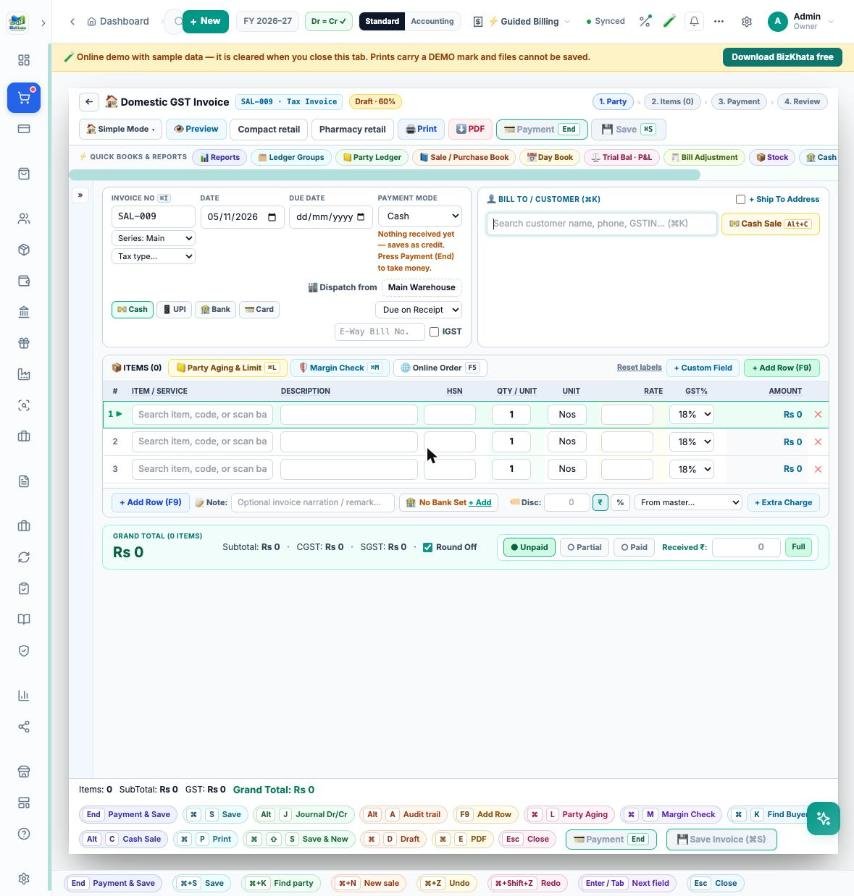
- Add a client once (name, GSTIN, address) and pick them from the list next time.
- Add service lines with a description, HSN/SAC code, quantity, rate and GST %.
- Add a discount or an extra charge, choose Unpaid, Partial or Paid, and save.
- Print on A4, save as PDF or send on WhatsApp.
Estimates, recurring work and advances
Send an Estimate first and turn it into an invoice after approval. For monthly retainers use Recurring invoices. Money received before the work can be recorded as a receipt against the client’s account and settled against the invoice later, so the client ledger always shows what is really due.
Know who owes you
The Party Ledger shows every invoice and receipt for a client, and the dashboard lists overdue invoices with a one-click WhatsApp reminder. A UPI QR can be printed on the invoice so clients pay on the spot.
TDS and the CA
A TDS / TCS section keeps a record of tax deducted by clients. At the end of the month or year, the Share to CA screen builds one zip with your sales report, GST summary and trial balance for your accountant.
FAQ
Do I need GST registration? BizKhata can bill with or without a GSTIN; without one, invoices carry no GST.
Does it work offline? Yes, on Windows and Mac.
Can I use my own logo and bank details? Yes — logo, signature, stamp, bank account and UPI ID are set once in Company settings and print on every invoice.
Try it on your own bills
Open the online demo (sample shop, nothing to install) or download the 7-day free trial for Windows and Mac. BizKhata works offline, so billing never waits for the internet.