Beauty Salon Billing Software — GST Format with Staff Commission
A salon bill isn't just a service charge — it's tied to a stylist, sometimes a membership package, and often a retail product with its own GST rate. Here's the correct salon bill format and how BizKhata handles commission and packages automatically.
Why Beauty Salon Billing Software Works Differently
Beauty salon billing software has to connect three things a generic invoice never links: the service performed, the stylist who performed it, and whether the customer is paying per-visit or drawing down a prepaid package. A plain "Haircut — ₹500" line item tells you nothing about who should get commission for it, or whether it was actually a package redemption that shouldn't be billed as a fresh sale.
Add retail product sales — shampoo, styling products, cosmetics — sold at the same counter under a completely different GST classification than the service itself, and a salon's billing needs turn out to be closer to a hybrid of service billing and retail billing than either alone.
Beauty Salon GST Bill Format — Required Fields
| Field | Why It's Needed |
|---|---|
| Invoice number & date | Standard GST requirement, sequential for the financial year |
| Service name & SAC code | Classifies the service for GST purposes |
| Stylist / staff name | Links the service to the person who performed it, for commission |
| GST rate (service) | Typically 18% on salon services |
| Retail product & HSN code | If sold alongside services, needs its own classification and rate |
| Package / membership reference | If the service is a redemption, not a fresh charge |
| Payment mode | Cash, UPI, card, or package balance |
| Total invoice value | Final payable amount, GST included |
Common Billing Challenges for Beauty Salons
- Staff commission tracking — manually tallying which stylist earned what commission each day is slow and error-prone
- Package and membership billing — a redemption from a prepaid package shouldn't be billed as a new full-price sale
- Mixed service + product bills — a service (SAC code) and a retail product (HSN code) on one bill need separate GST handling
- Appointment-to-bill linking — walk-ins and scheduled appointments both need to flow cleanly into the final invoice
- Multi-stylist services — some services involve more than one staff member, splitting commission correctly
See BizKhata's Business Templates in Action
Below is BizKhata's template gallery — the Beauty Salon template sits alongside 30+ other GST-ready formats, pre-configured with staff and package fields so you're not building the invoice structure from scratch.
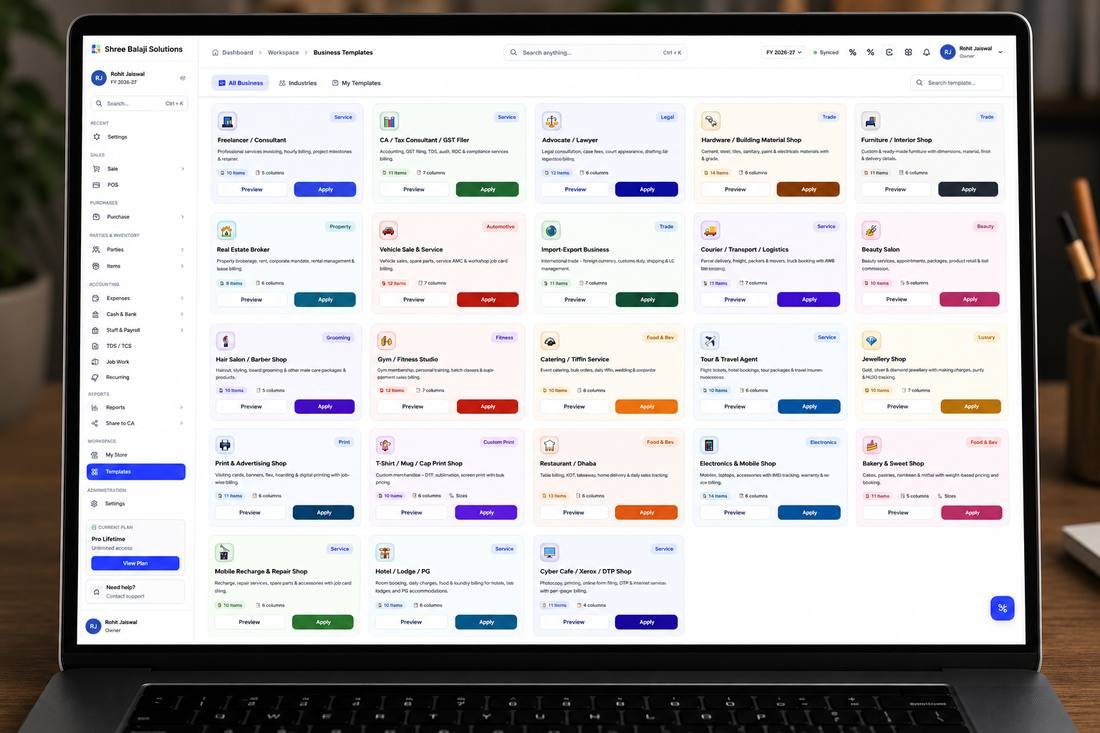
BizKhata's Beauty Salon template, ready to apply with one click
How Beauty Salon Billing Software from BizKhata Works
- Apply the Beauty Salon template — service, stylist and package fields are pre-configured.
- Select the service and assign the stylist — commission calculates automatically against that service.
- Bill fresh or redeem from a package — package balance deducts correctly instead of double-charging.
- Add retail products if sold — billed under their own GST rate, separate from the service.
- GST applies automatically — 18% on services, product-specific rate on retail items.
- Print or share the bill — thermal receipt at the counter or a WhatsApp bill for the customer.
Why Beauty Salons Choose BizKhata
Staff Commission, Automatic
Every billed service calculates the assigned stylist's commission — no manual daily tally.
Package & Membership Billing
Prepaid packages deduct correctly on redemption instead of billing as a fresh sale.
Service + Product on One Bill
SAC-coded services and HSN-coded retail products, each taxed correctly on the same invoice.
Multi-Stylist Support
Services involving more than one staff member split commission correctly.
Offline & Reliable
Billing continues at the counter even if the internet connection drops.
One-Time Lifetime Plan
No recurring subscription — pay once for a billing system built for service-based retail.
Related Retail & Shop Templates
BizKhata includes GST-ready templates for other retail and service formats too — explore the ones closest to your business:
Frequently Asked Questions
A salon GST bill needs an invoice number and date, service name with SAC code, stylist/staff name, GST rate and amount (typically 18% on services), any retail products sold separately with their own HSN code, and the total invoice value.
Beauty and salon services are generally taxed at 18% GST, while retail products sold at the counter (like shampoo or cosmetics) follow their own product-specific GST rate, so a combined service-plus-product bill can need two different rates.
Staff commission tracking links each billed service to the stylist who performed it, calculating their commission automatically based on a set percentage or slab, rather than requiring a manual tally at the end of each day.
Yes, salon billing software should support prepaid packages and memberships, deducting individual services from the package balance on each visit while still generating a compliant GST invoice for the original package purchase.
Yes, they can appear on the same invoice, but each should carry its own correct classification and GST rate — services under their SAC code and retail products under their own HSN code — rather than being merged into one line item.
Yes. BizKhata's Beauty Salon template links billing to services, stylists and packages, calculates staff commission automatically, and applies the correct GST rate to services and retail products separately.
Bill Services, Staff Commission and Products Correctly
Download BizKhata free for Windows or Mac — commission tracking, packages, GSTR-ready.
Download BizKhata Free