GST Invoice Template — Free Format & Auto-Generated Invoices
A ready-to-use GST invoice template with every field mandated under Rule 46 of the CGST Rules — GSTIN, HSN/SAC, CGST/SGST/IGST split and more — plus a look at how BizKhata generates a compliant invoice automatically in seconds.
What Is a GST Invoice Template?
A GST invoice template is a pre-formatted billing document that includes every field required under India's Goods and Services Tax law, so a business owner does not have to design an invoice from scratch or risk leaving out a mandatory detail. Under the CGST Act, any registered business supplying taxable goods or services must issue a tax invoice for each sale, and that invoice has to follow a specific structure — not just any bill will do.
Using a proper GST invoice template matters for three reasons: it keeps you compliant during a GST audit, it lets your buyer claim Input Tax Credit (ITC) without disputes, and it gives you a consistent, professional record for your own books. A template — whether it's an Excel sheet, a Word file, or a screen inside billing software — simply pre-fills the required structure so every invoice you issue automatically meets these rules.
Mandatory Fields in a GST Tax Invoice (Rule 46)
Rule 46 of the CGST Rules, 2017 lays out exactly what a GST tax invoice must contain. Missing any of these fields can make an invoice non-compliant and put your buyer's Input Tax Credit claim at risk.
| Field | Why It's Required |
|---|---|
| Invoice number & date | Unique, sequential serial number for the financial year |
| Supplier name, address, GSTIN | Identifies the registered seller |
| Buyer name, address, GSTIN (if registered) | Needed for the buyer to claim ITC |
| HSN/SAC code | Classifies the goods or service for tax purposes |
| Description & quantity | Line-item detail of what was sold |
| Taxable value | Value before tax, per line item |
| CGST/SGST or IGST rate & amount | Tax split depends on place of supply |
| Total invoice value | Final payable amount, tax included |
| Signature of supplier | Physical or digital, authorising the invoice |
Types of GST Invoices You May Need
Not every sale uses the same invoice type. Depending on the transaction, a business typically issues one of the following:
- Tax Invoice (B2B) — standard GST-charged invoice between two registered businesses
- Retail Invoice (B2C) — simplified format for sales to unregistered consumers
- Export Invoice — issued in foreign currency for goods or services sold outside India, usually under LUT
- Bill of Supply — used by composition dealers or for exempt supplies, where no GST is charged
- Credit/Debit Note — issued to adjust a previously raised invoice for returns, discounts or corrections
- Receipt Voucher — issued against an advance payment received before the actual supply
See a GST Invoice Template in Action
Below is an actual domestic GST sale invoice screen from BizKhata — showing GST-compliant fields, GSTIN, HSN/SAC and the CGST/SGST/IGST breakup, generated automatically as you bill.
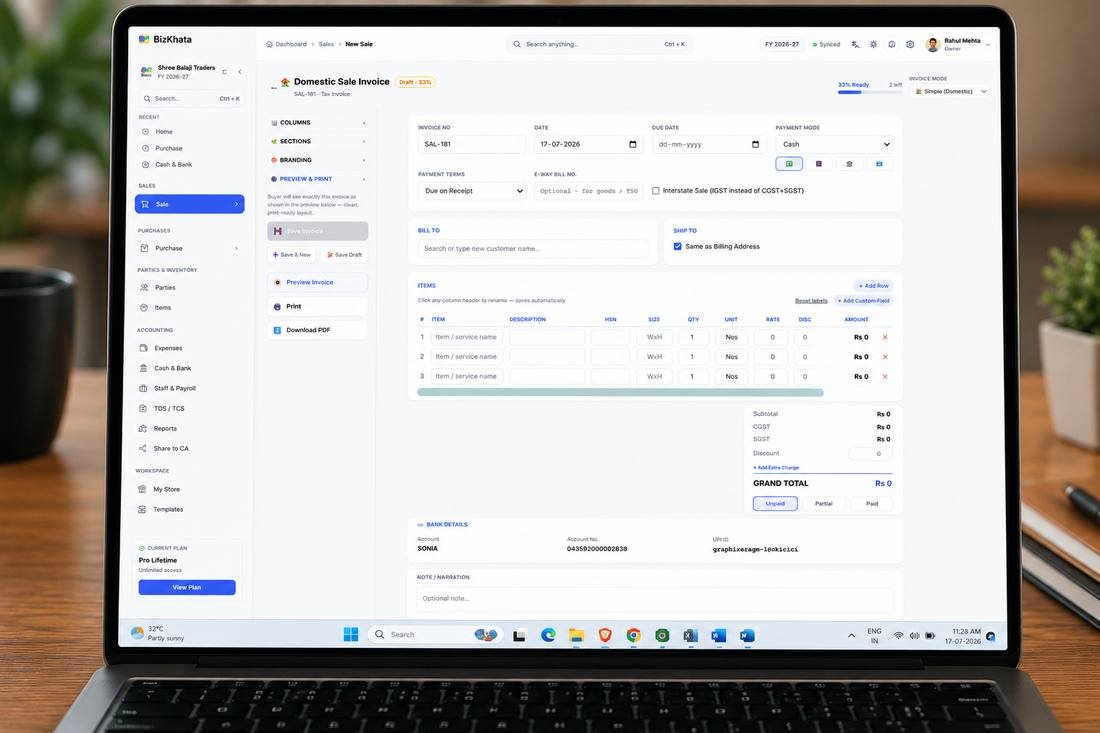
Domestic GST invoice screen — BizKhata auto-fills GSTIN, HSN/SAC and tax split
How to Create a GST Invoice (Step by Step)
- Pick a compliant template — Excel/Word manually, or use billing software that already follows Rule 46.
- Enter supplier & buyer details — including both GSTINs if the buyer is registered.
- Add line items with HSN/SAC codes — quantity, rate and taxable value per item.
- Apply the correct tax split — CGST+SGST for intra-state sales, IGST for inter-state or export.
- Generate the final invoice number — must be sequential and unique for the financial year.
- Share or print — as PDF, WhatsApp, or a printed copy for the buyer's records.
Free Template vs. GST Billing Software
A free Excel or Word GST invoice template works fine for a handful of invoices a month, but it doesn't scale — every field has to be typed manually, tax calculation is manual too, and there's no searchable record for GSTR filing. Here's what changes when you move to dedicated software like BizKhata:
Auto Tax Calculation
CGST, SGST and IGST are calculated automatically based on the place of supply — no manual formula errors.
Offline, No Monthly Fee
BizKhata runs fully offline on Windows and Mac with a one-time lifetime plan, unlike cloud tools billed monthly.
GSTR-Ready Reports
Every invoice feeds directly into GSTR-1 and GSTR-3B reports, so return filing doesn't mean re-entering data.
Export Invoicing
A dedicated International billing mode handles export invoices in foreign currency alongside domestic GST billing.
30+ Business Templates
Industry-specific invoice layouts for retail, restaurants, pharmacy, salons and more, all GST-compliant by default.
E-Invoice & E-Way Bill
Generate E-Invoices and E-Way Bills directly from the same screen where you raise the GST invoice.
GST Invoice Formats for Specific Businesses
Different trades need slightly different line items on their GST invoice — a restaurant bill looks different from an export commercial invoice. Explore GST-compliant templates built for your industry:
Frequently Asked Questions
A correct GST invoice format includes a unique serial number, invoice date, supplier and buyer GSTIN, HSN/SAC code, taxable value, applicable CGST/SGST or IGST rate and amount, and the total invoice value, as prescribed under Rule 46 of the CGST Rules.
Yes. You can use a free Excel or Word GST invoice template for manual billing, though software like BizKhata is recommended once invoice volume grows, since it auto-calculates tax and keeps a searchable record.
Mandatory fields include invoice number and date, supplier name, address and GSTIN, buyer details, HSN/SAC code, description and quantity, taxable value, tax rate and amount split by CGST/SGST/IGST, and the signature of the supplier or authorised representative.
Yes, a GST invoice can be created manually in Excel or Word as long as all mandatory fields under Rule 46 are included, though this becomes error-prone and time-consuming once invoice volume increases.
A tax invoice is issued when GST is charged on a sale, while a bill of supply is issued by composition scheme dealers or for exempt goods and services, where no GST is charged.
Yes. BizKhata's Domestic GST invoicing mode auto-calculates CGST, SGST and IGST based on the place of supply, applies the correct HSN/SAC codes, and generates a print-ready, rule-compliant invoice in seconds.
Start Billing GST-Compliant Invoices Today
Download BizKhata free for Windows or Mac — no monthly fee, fully offline, GSTR-ready.
Download BizKhata Free