Restaurant Billing Software — GST Invoice Format & KOT Billing
Table orders, kitchen tickets, takeaway and delivery all need to end up on one correct GST bill. Here's the restaurant invoice format that covers dine-in, takeaway and delivery, and how BizKhata bills a restaurant counter from order to invoice.
Why Restaurant Billing Is Different
A restaurant bill starts long before the final invoice — an order is taken at the table, sent to the kitchen as a KOT (Kitchen Order Ticket), items get added or modified mid-order, and only once the table is ready to pay does the actual GST invoice get generated. Takeaway and delivery orders skip the table step but add their own complexity — customer address, delivery platform reference, and packaging charges.
None of this is captured by a generic sales invoice template. Restaurant billing software needs to track an order through its full lifecycle — table to kitchen to final bill — while still producing a GST-compliant invoice at the end, with service charge clearly separated from tax.
Restaurant GST Bill Format — Required Fields
| Field | Why It's Needed |
|---|---|
| Invoice number & date | Sequential GST requirement for the financial year |
| Table / order number | Links the bill back to the original KOT and order |
| Item name & HSN/SAC code | Food and beverage items classified for GST |
| Quantity & rate | Per-item pricing, especially for portions or add-ons |
| GST rate & amount | 5% (most restaurants) or 18% (specified hotel restaurants) |
| Service charge (if applied) | Shown separately — it is not a government tax |
| Payment mode | Cash, card or UPI, sometimes split |
| Total invoice value | Final payable amount, GST included |
Dine-In, Takeaway & Delivery — What Changes
- Dine-in — bill is linked to a table number and typically follows one or more KOTs as the order builds
- Takeaway — same GST fields as dine-in, minus the table number, usually a faster single-shot bill
- Delivery — adds customer address and a platform or order reference number, often with a separate delivery/packaging charge line
- KOT vs Bill — a KOT is an internal kitchen slip, not a tax document; only the final invoice needs to be GST-compliant
See a Restaurant Invoice Screen in Action
Below is BizKhata's Advance Studio invoice screen — the same custom invoice design mode restaurants can use for polished, branded bills across dine-in, takeaway and delivery.
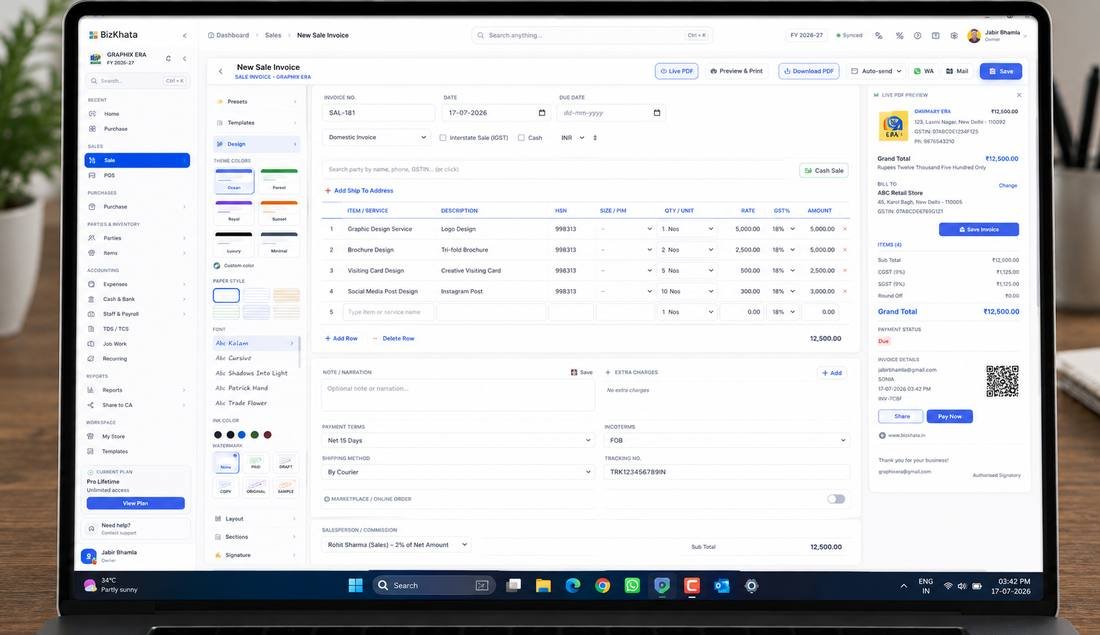
Advance Studio — custom invoice design, usable for restaurant table and takeaway bills
How BizKhata Bills a Restaurant
- Apply the Restaurant / Dhaba template — table billing and KOT fields pre-configured.
- Open a table or takeaway order — add items as the order builds, generate a KOT for the kitchen.
- Edit the order as needed — add, remove or modify items before the table is ready to pay.
- Generate the final GST invoice — correct rate applied automatically, service charge shown separately.
- Print or share — thermal receipt at the counter or a WhatsApp bill for delivery orders.
Why Restaurants Choose BizKhata
Table & KOT Billing
Track an order from table to kitchen to final invoice, without re-entering items at each step.
Takeaway & Delivery Ready
Quick single-shot billing for takeaway, with address and reference fields for delivery orders.
Correct GST, Automatically
5% or 18% applied based on how your restaurant is set up, with service charge kept separate.
Branded Invoice Design
Advance Studio lets you customise the bill's look — theme, paper style and watermark.
Works Fully Offline
Billing continues through peak hours even if the internet connection drops.
One-Time Lifetime Plan
No monthly fee — pay once for a restaurant billing system built for a busy counter.
Related Retail & Shop Templates
BizKhata includes GST-ready templates for other retail and food formats too — explore the ones closest to your business:
Frequently Asked Questions
A restaurant GST bill needs an invoice number and date, table or order number, item names with HSN/SAC code, quantity, taxable value, GST rate and amount, and the total including any service charge shown separately from tax.
Most standalone restaurants charge 5% GST without Input Tax Credit, while restaurants inside hotels with room tariffs above a specified threshold charge 18% GST with ITC — the applicable rate depends on the establishment type.
A KOT (Kitchen Order Ticket) is an internal slip sent to the kitchen listing what to prepare for a table, while the final bill is the customer-facing GST invoice generated once the order is complete — a KOT is not a tax document.
No. Service charge is a separate, optional amount some restaurants add for staff, while GST is a mandatory government tax — the two should appear as distinct line items and are not GST-eligible.
Takeaway and delivery bills use the same GST invoice fields as dine-in, minus the table number, though delivery orders often add the customer's address and a platform or order reference number.
Yes. BizKhata's Restaurant / Dhaba template supports table billing, KOT generation, takeaway and delivery tracking, and auto-calculates GST on the final invoice.
Bill Your Restaurant Table to Takeaway
Download BizKhata free for Windows or Mac — table billing, KOT, GST-ready invoices.
Download BizKhata Free