
Short answer: An exporter’s invoice carries details a domestic bill does not: currency and exchange rate, incoterm, shipping bill number, port code, IEC, AD code and the LUT number under which GST is zero-rated. BizKhata has an Export bill mode that asks for exactly these, so one software handles both your domestic and export sales.
What the export invoice captures
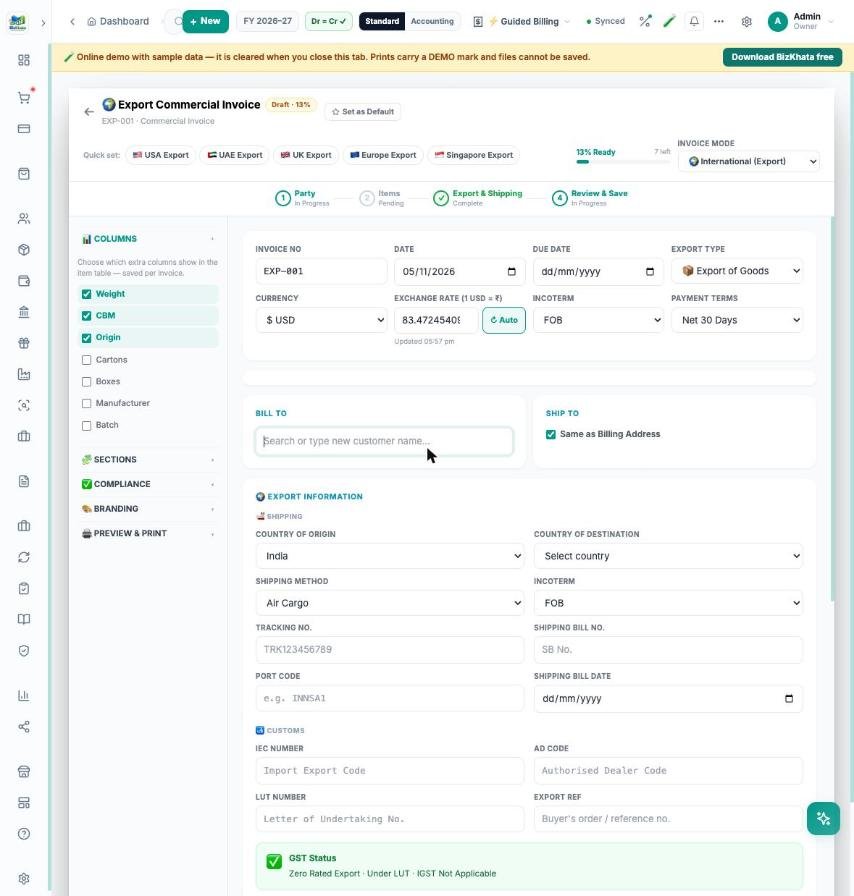
- Currency and rate: pick the currency (for example USD) and fetch the exchange rate, or type your own.
- Terms: incoterm (FOB and others), payment terms and export type.
- Shipping: country of origin and destination, shipping method, tracking number, shipping bill number and date, port code.
- Customs and compliance: IEC number, AD code, LUT number and export reference.
- GST status: under LUT the invoice shows as zero-rated export with no IGST charged.
Quick-set for common markets
Quick-set buttons for USA, UAE, UK, Europe and Singapore fill the usual currency and terms. A step bar (Party, Items, Export & Shipping, Review & Save) shows how complete the invoice is, and a live preview prints the commercial invoice.
Domestic and export in one place
Your domestic invoices, purchases, stock and ledgers stay in the same books, so the GST summary, trial balance and the Share to CA pack cover both. International Billing settings keep your export defaults.
FAQ
Does it handle goods above the e-way bill limit? Yes, domestic bills prompt for an e-way bill number above the amount you set in Settings.
Can I send the invoice as PDF? Yes — preview, print, PDF or share.
Try it on your own bills
Open the online demo (sample shop, nothing to install) or download the 7-day free trial for Windows and Mac. BizKhata works offline, so billing never waits for the internet.