Kirana & Grocery Shop Billing Software — GST Bill Format & Free Template
India's kirana stores bill differently from any other retail shop — multiple GST slabs on one receipt, daily udhaar (credit) for regulars, and a counter that can't afford a slow app. Here's the correct bill format and how BizKhata bills a kirana counter in seconds.
Why Kirana & Grocery Billing Is Different
India has an estimated 12–15 million kirana stores, making it the country's single largest retail format — and also one of the hardest to bill correctly. A single kirana bill routinely mixes loose atta and vegetables at 0% GST with packaged biscuits at 18%, soap at 18%, and branded snacks at 12%, all on one receipt. On top of that, 60–70% of kirana transactions involve some form of customer credit (udhaar), and the counter sees bursts of 100–300 customers a day where billing has to take seconds, not minutes.
A generic invoice template built for services or B2B trade doesn't hold up under these conditions. A kirana or grocery bill format needs to handle multi-slab GST per line item, track running customer balances, and stay fast enough for a real counter — which is exactly what this page and BizKhata's Kirana / Grocery Shop template are built around.
Kirana / Grocery Bill Format — Required Fields
| Field | Why It Matters |
|---|---|
| Bill number & date | Sequential record for daily sales reconciliation |
| Customer name & phone | Needed to track udhaar (credit) against a regular customer |
| Item name & quantity | Loose items (kg/litre) and packaged items (units) both need clear quantity |
| GST rate per item | 0%, 5%, 12% or 18% — must be set per item, not per bill |
| Rate & line total | Price per unit and the extended amount |
| Payment mode | Cash, UPI, or udhaar (credit) — often split across one bill |
| Outstanding balance | Running total if any amount is added to the customer's khata |
| Grand total | Final payable amount after all tax slabs are summed |
Common Billing Challenges for Kirana Shops
- Multiple GST slabs on one bill — most billing apps make you set one tax rate per invoice, not per item
- Udhaar (credit) tracking — a manual khata book gets unreliable once a shop has more than a handful of regular credit customers
- Speed at the counter — customers arrive in bursts; a 60–90 second bill is too slow during peak hours
- Unreliable internet — many kirana shops, especially outside metro areas, cannot depend on a live connection for billing
- Language comfort — many shop owners are more comfortable billing in Hindi or a regional language than English
See a Kirana Billing Screen in Action
Below is BizKhata's dashboard view — the same screen a kirana or grocery shop owner sees, showing today's sales, cash flow and GST due date at a glance before jumping into a new bill.
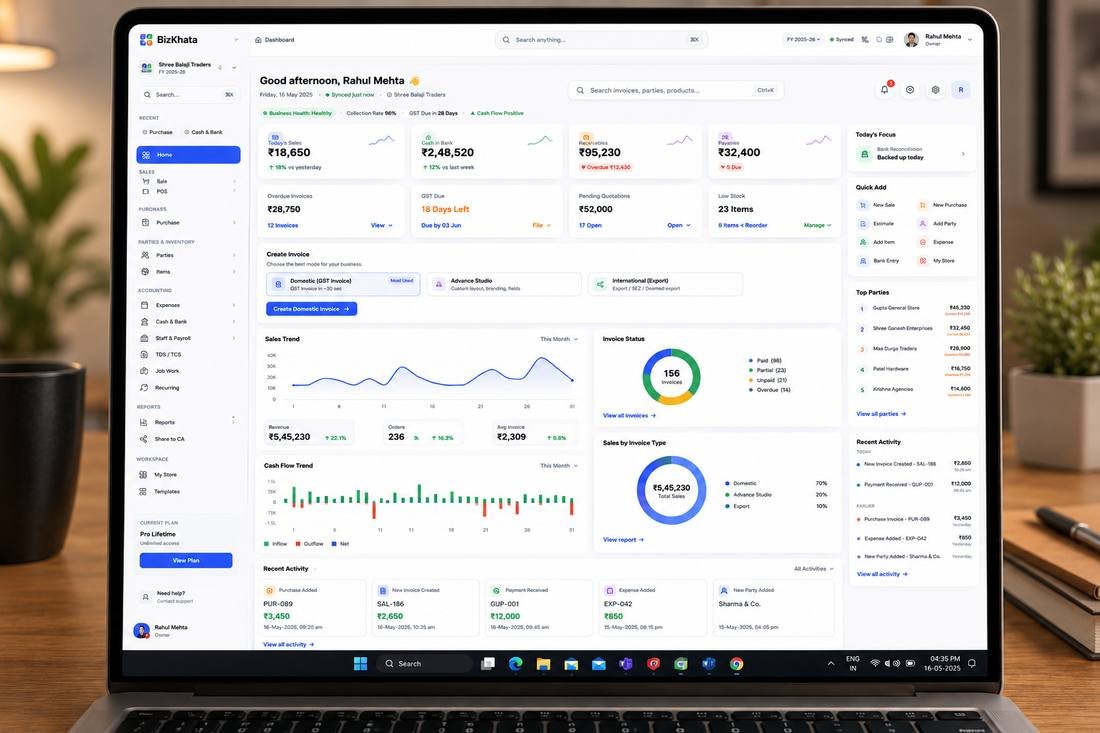
BizKhata dashboard — sales, cash flow and GST due date at a glance
How BizKhata Bills a Kirana Counter
- Pick the Kiryana / Grocery Shop template — pre-loaded with common item categories and multi-slab GST already configured.
- Scan or search the item — barcode scanning support for packaged goods, quick search for loose items.
- GST auto-applies per item — no manual tax-rate selection, even when a bill mixes 0%, 5%, 12% and 18% items.
- Split payment or add to udhaar — part cash, part credit against the customer's running balance.
- Print or share on WhatsApp — thermal printer receipt or a digital bill sent instantly.
Why Kirana Owners Choose BizKhata Over a Manual Register
Multi-Slab GST, Automatically
Each item carries its own GST rate — the bill calculates 0%, 5%, 12% and 18% items together without manual work.
Udhaar (Credit) Tracking
Every regular customer gets a running balance, so outstanding credit is always visible — no more khata book guesswork.
Works Fully Offline
BizKhata is a native desktop app — billing continues even with an unreliable or absent internet connection.
10 Indian Languages
Bill in Hindi or another regional language if that's more comfortable at the counter.
Barcode & POS Mode
Scan packaged items directly, with thermal printer support for a busy, high-footfall counter.
One-Time Lifetime Plan
No monthly subscription — pay once and keep billing, unlike most cloud-based kirana billing apps.
Related Retail & Shop Templates
BizKhata includes GST-ready templates for other retail formats too — explore the ones closest to your business:
Frequently Asked Questions
A kirana bill format needs a bill number and date, customer name and phone (for udhaar/credit tracking), each item with its own GST slab since groceries mix 0%, 5%, 12% and 18% items on one bill, quantity and rate, and the total with any outstanding balance carried forward.
No. Many kirana items like loose grains, fresh vegetables and unbranded staples are exempt from GST, while packaged and branded goods attract 5%, 12% or 18% GST depending on the product, so a single bill often mixes multiple tax slabs.
GST registration is compulsory only once annual turnover crosses the threshold limit (₹40 lakh for goods in most states, lower for special category states). Below that, a kirana shop can operate without GST registration and without charging GST.
Udhaar is best tracked digitally against each customer's profile so outstanding balances are visible at a glance and reminders can be sent — manual khata books are error-prone once a shop has more than a handful of regular credit customers.
Yes, offline billing software like BizKhata works without an internet connection, which matters for shops in areas with unreliable connectivity, since cloud-only billing apps stop working the moment the connection drops.
Yes. BizKhata supports billing in 10 Indian languages including Hindi, so kirana shop owners can bill in the language they're most comfortable with.
Bill Your Kirana Counter in Seconds
Download BizKhata free for Windows or Mac — multi-slab GST, udhaar tracking, fully offline.
Download BizKhata Free