
Short answer: Three jobs that usually need a separate accountant’s tool are inside BizKhata: reconciling the bank book against the bank statement, matching purchase bills with the supplier’s GSTR-2B, and valuing stock by FIFO or weighted average.
Bank reconciliation (BRS)
Cash & Bank shows every account as a ruled ledger with separate Deposit and Withdrawal columns, running balance and a bank status for each entry. Open Bank Recon (BRS) and you get the formula an accountant uses: balance as per books, plus payments not yet cleared, minus deposits not yet cleared, equals the computed bank balance — compared with the balance on your statement. Type the bank date on each entry, or import the statement and let the software match.
- Import Statement: CSV, Excel or PDF. Text PDFs are read directly; a scanned PDF is read with OCR (check the amounts afterwards).
- Auto-match: entries are cleared by UTR or cheque number first, then by a single matching amount within a week. Anything not in your books (bank charges, interest) is listed so you can create the entry.
GSTR-2B match
Import the GSTR-2B file (JSON or Excel) once. The Purchase Register then shows a GSTR-2B card — how many bills matched and how many are still pending — and a badge on every bill: matched, differs, or not in 2B yet. Supplier bill number and GSTIN are used, so enter the supplier’s own bill number on each purchase. The register also shows Input GST credit (ITC) and a bill inspector (Alt+F5) with the double entry.
FIFO or weighted average
In Settings → Accounting & Billing Rules choose Stock valuation method. With FIFO the oldest purchase is sold first, so cost of goods sold follows the order of your purchases; with weighted average every issue is costed at the blend. Example: 10 units at ₹100 and 10 at ₹120, then 15 sold — FIFO gives cost ₹1,600 and stock ₹600; average gives ₹1,650 and ₹550. Statements recompute from your bills, so pick one method and keep it for the year.
Send the result to your CA
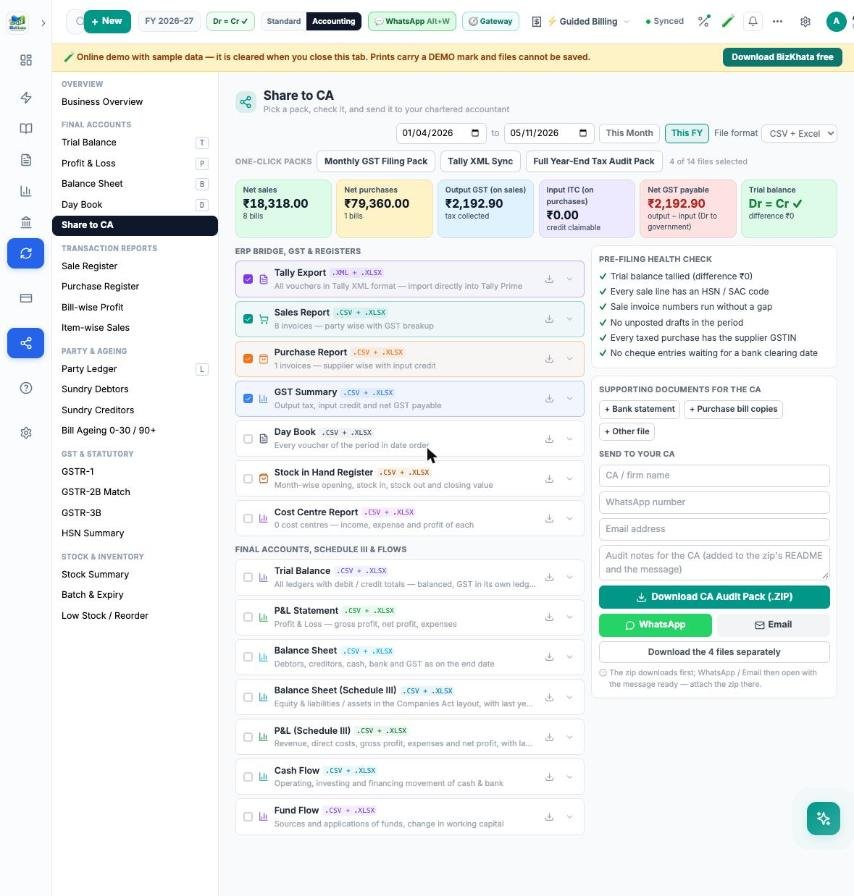
The Share to CA pre-filing check warns about untallied books and cheques still waiting for a bank date, so the pack goes out clean.
FAQ
Can I change the stock method later? Yes, but past reports will re-cost, so avoid changing in the middle of a year.
Does matching change my bills? No. Bank matching only sets clearing dates, and 2B matching only labels the bills.
Try it on your own bills
Open the online demo (sample shop, nothing to install) or download the 7-day free trial for Windows and Mac. BizKhata works offline, so billing never waits for the internet.